Clear Clipboard Automatically After Paste by Pressing Ctrl + V
Automatically clear the clipboard once you have pasted clipboard contents onto the required application on Windows. Auto Clear Clipboard also allows you to clear the clipboard using either Left Ctrl + V or Right Ctrl + V so that you can control when clipboard contents are cleared. This Auto Clear Clipboard application works on Windows 10 and Windows 11 with a free trial download available. You can also configure audible alerts on clipboard changes, whether for text, images, or any other clipboard format. This is convenient when copying sensitive data such as passwords to paste into a browser or application. Password manager apps allow you to store passwords and copy them to the clipboard, but they might not manage what happens to passwords remaining on the clipboard. This software utility allows you to empty or delete clipboard contents once you perform a paste operation by pressing Ctrl + V.
Free Trial Download of Auto Clear Clipboard
Download Auto Clear Clipboard Software Utility on your 64-bit Windows 11 or Windows 10 computer and try it for free. Once the free trial expires, you can pay an activation fee of $7.89 to use it for up to 6 months from the date of payment. There are no feature restrictions in the free trial version of Auto Clear Clipboard; it is fully functional with usage limits only.
Features of Auto Clear Clipboard
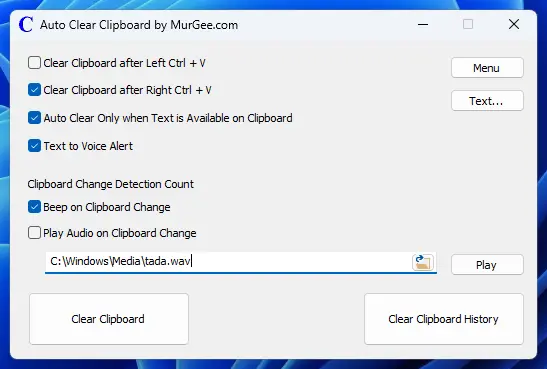
Because the clipboard is a shared resource on Windows, it can be accessed by any application running on your computer. The Auto Clear Clipboard utility allows you to automatically clear data stored on the clipboard once it has been pasted using Ctrl + V. Listed below are the features of the software utility. Take a look at the screenshot below to see all the features offered by this software utility for Windows.
- You can automatically clear clipboard contents on Left Ctrl + V, Right Ctrl + V, or both.
- An audible beep or audio file playback can be configured whenever clipboard contents change. The audio alert is played when clipboard content is cleared or when text, images, or files are copied to the clipboard.
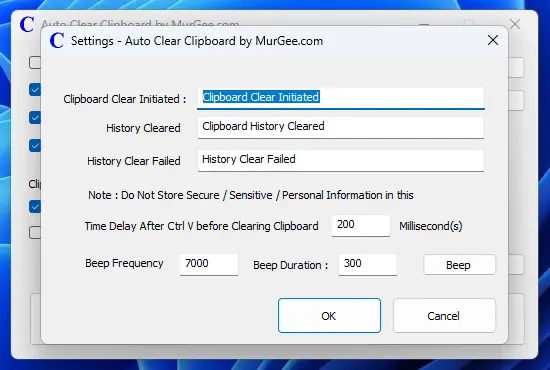
- Configurable settings allow you to control the time duration after which the clipboard is cleared upon pressing Ctrl + V.
- You can optionally auto-clear clipboard contents only when text is present on the clipboard.
- You can also auto-clear clipboard contents at regular time intervals, configurable in seconds.