Frequently Asked Questions
Everything you need to know about automatically clearing your Windows 11 or Windows 10 clipboard after pressing Ctrl + V, configuring timers, audio alerts, and software licensing.
How do I automatically clear my clipboard after pressing Ctrl+V on Windows 11 or Windows 10?
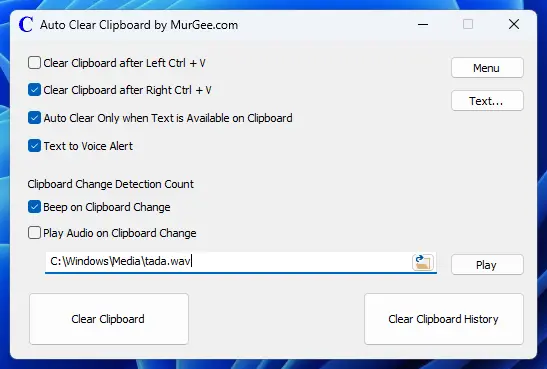
Install and launch Auto Clear Clipboard, then choose whether to trigger automatic clipboard clearing on Left Ctrl + V, Right Ctrl + V, or both. Once enabled, pressing Ctrl + V pastes your data into the active window and clears the clipboard automatically after your configured delay.
What is the difference between Left Ctrl+V and Right Ctrl+V triggers?
Auto Clear Clipboard lets you assign clearing specifically to Left Ctrl + V, Right Ctrl + V, or both keys. This lets you keep one shortcut for pasting the same snippet multiple times and reserve the other shortcut for one-time sensitive pastes like passwords.
Does Auto Clear Clipboard work with password managers like Bitwarden, 1Password, or KeePass?
Yes. Auto Clear Clipboard monitors Windows clipboard changes independently of the source app. Whenever you copy a password, recovery key, or 2FA token from a password manager and paste it, the utility clears the clipboard so the secret does not remain accessible to other programs.
Why should I set a short delay before clearing after Ctrl+V?
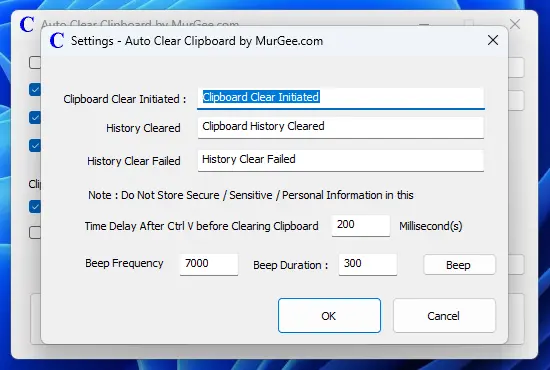
Some desktop applications, terminal windows, and web browsers take a brief moment to read the clipboard after receiving Ctrl + V. Setting a short delay in seconds ensures the target app finishes pasting cleanly before the clipboard is emptied.
Can I clear the clipboard on a repeating timer without pressing Ctrl+V?
Yes. In the settings window, you can configure a recurring interval in seconds to clear the clipboard automatically on a schedule—ideal if you copy sensitive text and get interrupted before pasting.
Does it clear images and copied files, or only text?
By default, Auto Clear Clipboard empties all clipboard formats (text, images, and copied files). If you prefer to keep screenshots or file copies intact, enable the option to auto-clear clipboard contents only when text is present.
How do audible clipboard change alerts work?
You can configure an audible beep or play a custom audio file whenever clipboard contents are copied, changed, or cleared. Alerts work across text, images, and files so you always know when the clipboard updates.
What are the system requirements, free trial limits, and license pricing?
Auto Clear Clipboard supports 64-bit Windows 11 and Windows 10. The free trial includes all features with no functional restrictions and is limited only by usage count. After the trial expires, a one-time activation fee of $7.89 USD unlocks full software usage for 6 months.
How do I contact support?
You can email Support@MurGee.com for technical help or licensing questions.
Software Screenshots on Windows 11
Visual reference of the main Auto Clear Clipboard window and the settings dialog referenced in the answers above.